Your clinic build-out is moving, the contractor needs an answer, and the practice manager has a different drawing from the one attached to yesterday's email. Meanwhile, a remote coordinator is updating the opening schedule without knowing whether the revised completion date has been approved. Everyone has documents. Nobody can confidently identify the decision that governs the work.
Project management documents are the written records that authorize, plan, control, report on and close out a project. Their value isn't the file itself. It's the connection between a decision, its owner, its approval status and the next action. A useful record tells you what was agreed, who can change it, which version applies and what happens next.
For U.S. medical practices, this applies to clinic renovations, office moves, EHR implementations and remote-staffing launches. The documents differ, but the management problem is familiar: providers, administrators, vendors and remote staff need clear boundaries without turning every task into paperwork. Administrative support can maintain records and follow up on decisions, but it shouldn't acquire clinical, financial or design approval authority.
The practical approach is to choose the smallest document set that preserves accountability. Construction projects need formal design and contract records; an appointment-scheduling implementation may use a combined scope summary and action log. In either case, start with the decisions people need to make, not with a folder full of templates.
Quick Reference to Common Project Management Documents
Project management documents answer specific questions: Who authorized the work? What's included? What changed? Who must respond? Has the owner accepted the result? Treat each document as a decision record with a named maintainer, not just as a file someone created at kickoff.
Common project management documents by purpose, stage and owner
| Document | Purpose | Typical Stage | Usual Owner |
|---|---|---|---|
| Project charter | Formally authorizes the project and names the sponsor and project manager | Initiation | Sponsor or project manager |
| Project management plan | Defines how scope, schedule, cost, quality, communications and change control will be managed | Planning | Project manager |
| Work breakdown structure | Divides the scope into deliverables and work packages | Planning | Project manager with discipline leads |
| Project schedule | Sequences tasks, dependencies and milestones against the approved baseline | Planning through closeout | Scheduler or project manager |
| Risk register | Lists risks with owners, likelihood, impact and planned responses | Planning, reviewed during execution | Project manager |
| Issue log | Tracks problems that need an owner and a resolution date | Execution | Project manager |
| RFI | Records a question about design documents and the written response | Execution | Design team and contractor |
| Submittal log | Tracks product data and shop drawings submitted for review and approval | Procurement and construction | Contractor and design team |
| Change order | Records an agreed change to scope, cost or time | Execution | Owner, contractor and design team |
| Meeting minutes | Records decisions, action items, owners and due dates | Throughout | Meeting facilitator |
| Status report | Summarizes progress, budget position, top risks and decisions needed | Throughout | Project manager |
| Closeout package | Collects as-built drawings, manuals, warranties and final reports | Closeout | Project manager and contractor |
The owner column identifies who usually maintains the record, not necessarily who approves it. A remote project coordinator might update the change log, while the practice owner retains authority to approve added spending.
Use the table as a selection tool
Stages overlap. A risk register begins during planning but remains active during execution, and a schedule receives progress updates throughout delivery. When an authorized change requires rebaselining, retain the previous baseline and its approval history rather than overwriting the evidence.
Construction and design projects use particularly formal versions of these records. Smaller operational projects can combine several functions into a controlled workbook, provided the entries remain distinguishable and approvals are visible.
PMI's account of the PMBOK framework describes it as a guide rather than a complete encyclopedia, supporting an approach suited to project size, industry and delivery method. For example, a hypothetical twelve-unit renovation might use a concise scope summary and change log, while a multi-building medical campus needs fuller registers and document-control procedures.
The useful groupings are planning, requests and changes, reporting, closeout and information control. They describe what people do with the records, rather than which software stores them.
Planning Documents That Set Scope, Schedule and Authority
A practice owner may authorize a clinic renovation without authorizing every finish selection, equipment purchase or schedule concession. Planning documents separate those decisions before vendors begin asking for answers.
Establish authority before assigning tasks
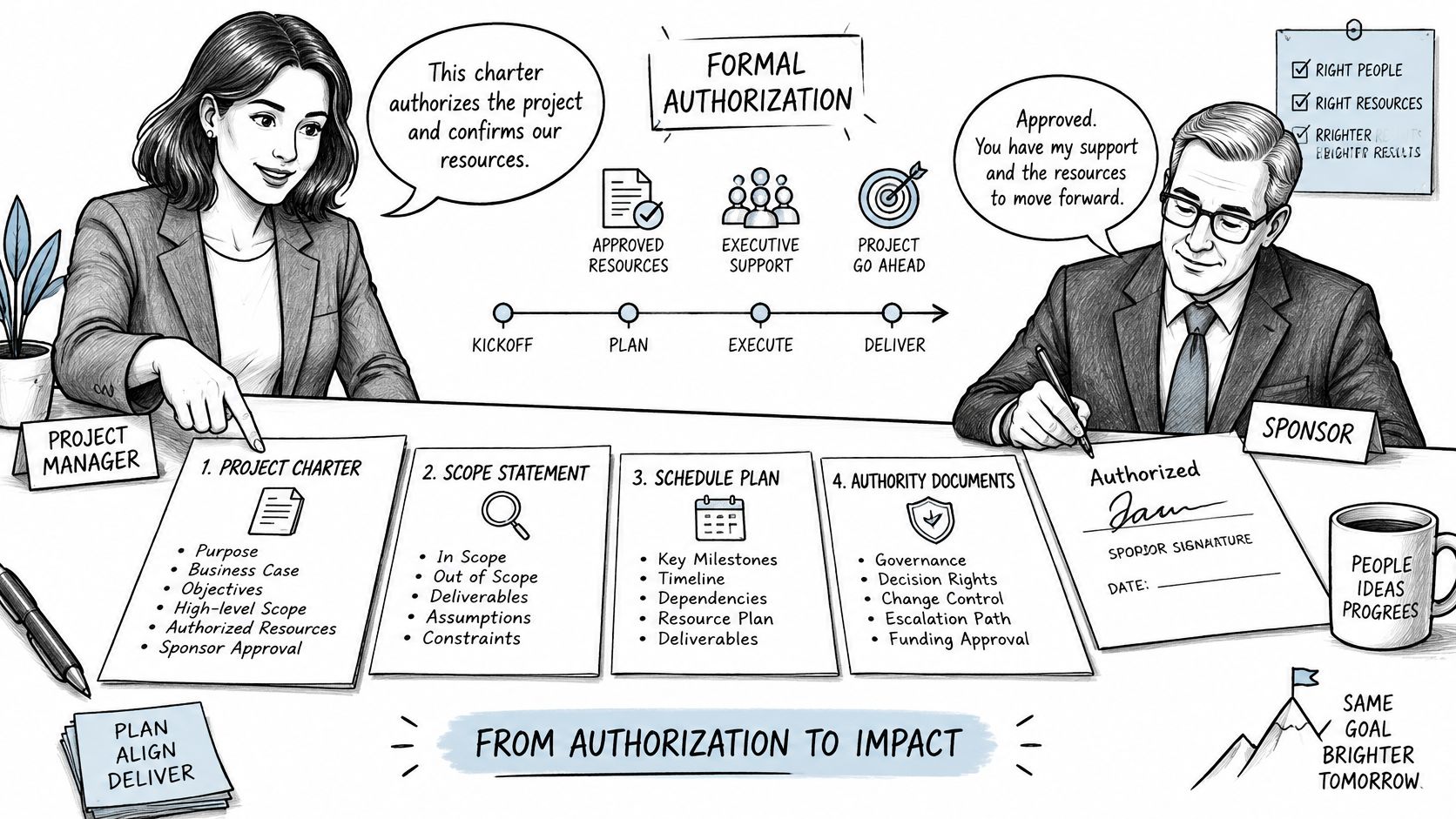
The project charter formally authorizes the project and gives the project manager authority to apply organizational resources, as defined in PMI's PMBOK Guide material. Include the business purpose, sponsor, manager, scope boundaries, major deliverables, assumptions, constraints and approval authority.
For a remote appointment-scheduling launch, the charter might authorize configuration and administrative training while excluding changes to clinical triage instructions. That boundary prevents a coordinator from treating a provider's informal suggestion as permission to redesign patient communications.
The project management plan explains how the team will manage scope, schedule, cost, quality, communications and changes. For a clinic build-out, it should identify who reviews design decisions, who approves purchases and how the practice will coordinate disruptive work around patient appointments. Mapping preconstruction team roles and responsibilities helps distinguish the practice's decisions from those belonging to architects, engineers and contractors.
Turn the scope into measurable work
The scope statement defines inclusions, exclusions and acceptance criteria. The work breakdown structure divides that scope into deliverables and work packages. A hypothetical twelve-unit renovation might separate demolition, rough-in, drywall, finishes and closeout; a medical-practice implementation might separate workflow design, system configuration, staff training, testing and handover.
The schedule then sequences the work and its dependencies. For example, staff training may depend on approved workflows and a configured test environment, not merely on the trainer's availability.

Baseline rule: Record the approved scope, budget and schedule before measuring performance against them. A moving target can make a delayed project appear on track.
A risk register records possible future events, with an owner, likelihood, impact and planned response. Permit-review delays could threaten a commercial tenant improvement, while incomplete insurance-verification training could threaten a staffing launch. Once the event occurs, manage the resulting problem in the issue log rather than leaving it described only as a possibility.
Use a stakeholder register and communications plan to identify who needs information and when. A provider may need approval requests about exam-room layouts; the billing lead may need updates about system downtime.
- For a small project: Combine the charter, scope statement and management approach into a signed scope summary.
- Before commitments: Fix the baseline date and obtain the necessary sign-off before procurement begins.
- For remote support: Specify what staff may prepare, what they may update and what requires an authorized reviewer.
Request, Change and Decision Records Teams Track
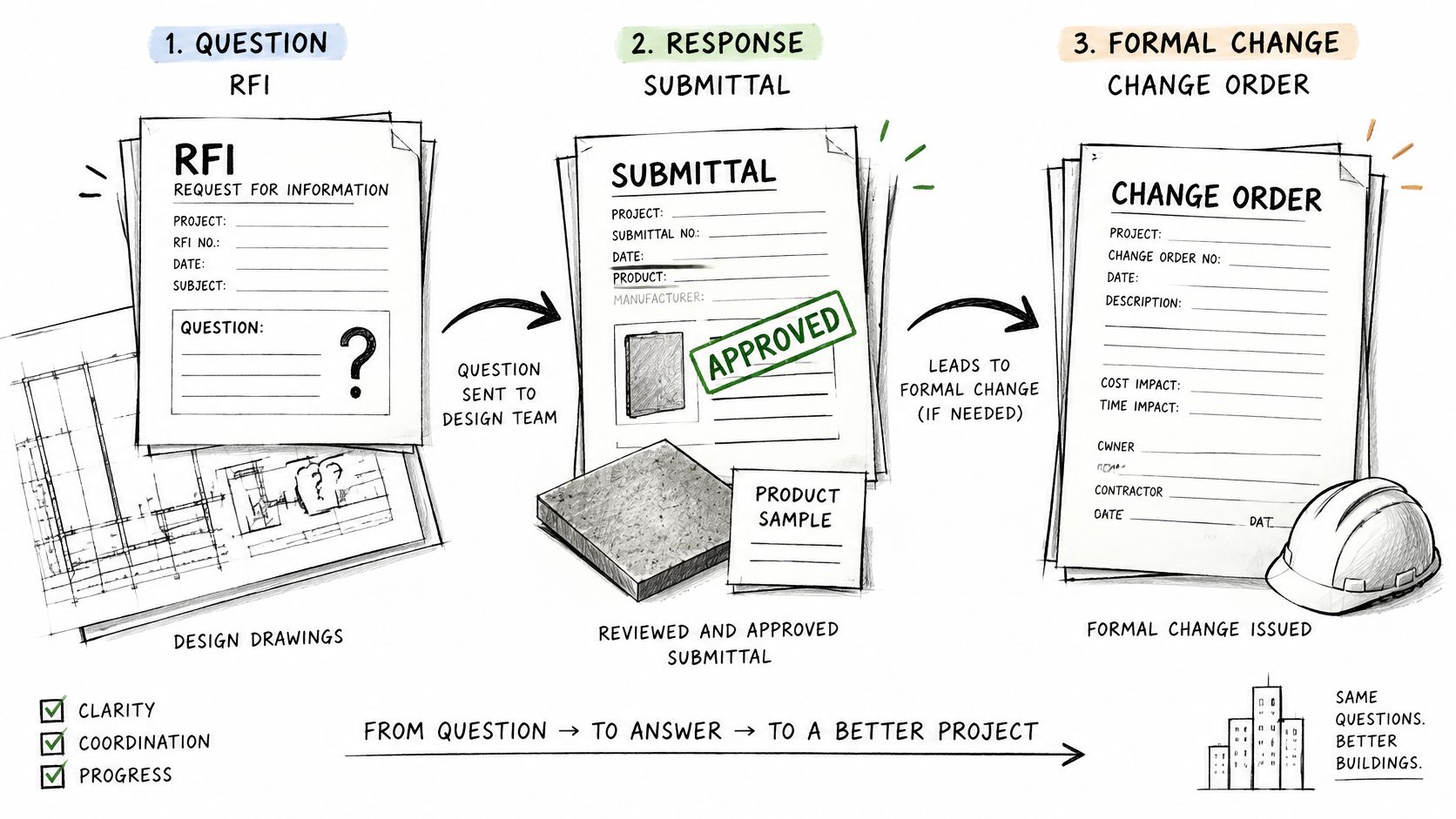
An RFI asks a question about drawings or specifications. A submittal presents a proposed product or shop drawing for review against the design requirements. Neither automatically authorizes additional spending or time, and an issue-log entry doesn't replace either process.
Request and change records compared
| Record | Raised to Resolve | Usually Answered By | Risk If Skipped |
|---|---|---|---|
| RFI | A question or clarification about drawings or specifications | Design team | Work proceeds on an assumption that a later revision contradicts |
| Submittal | Proof that a product or shop drawing meets the design intent | Design team review | Non-conforming materials are ordered or installed |
| Change order | An agreed change to scope, cost or time | Owner, contractor and design team | Extra work is performed without a cost or schedule agreement |
| Issue log entry | A problem that needs a named owner and a resolution date | Assigned action owner | Problems stay open without visible accountability |
The contractor typically raises construction RFIs and submits product information. An owner, designer or contractor may initiate a proposed change, while anyone identifying a delivery problem should be able to raise an issue through the agreed process. Contract terms determine the formal routing and approval authority.
An Autodesk-commissioned Dodge Data & Analytics study of more than 200 contractors and trade professionals found that 73% logged RFIs and responses on more than half their projects, while 75% of trade contractors reported RFIs to senior management as potential risk sources, compared with 64% of general contractors. The same study found that only 47% captured start, finish and turnaround times on change orders, and 53% captured errors, omissions and constructability issues in bid-set documents.
Those findings concern construction, not healthcare staffing. Their practical relevance to a clinic owner is the gap between having a document and preserving the information needed to manage its consequences.
Follow a question through to its final decision
Suppose a clinic drawing shows a reception counter that conflicts with the planned check-in equipment. The contractor raises an RFI identifying the drawing and revision, the precise conflict and the date an answer is needed.
The designer responds with a clarification or revised detail. If that response changes fabrication cost or installation time, the contractor submits the effect for evaluation through change control; the practice's authorized representative then approves or rejects the proposed commercial change.
Keep the chain connected:
- Origin: Drawing or specification identifier and the issue being clarified.
- Response: Written answer, responsible reviewer and response date.
- Authorization: Approval date, authorized party and any cost or schedule effect.
- Implementation: Revised document, affected work and final verification record.
A remote coordinator can maintain this chain and flag overdue responses. The coordinator shouldn't interpret an unanswered technical question, approve a material substitution or promise payment outside delegated authority.
Complete logging takes time, but selective logging needs a defensible threshold. Log every formal RFI, and route informal questions into that process when they could change a dimension, material, sequence, safety requirement, cost or completion date. Keep routine coordination chatter out of the formal register unless it becomes a decision others must rely on.
Status Reports and Logs That Keep Stakeholders Informed
The practice owner needs to know whether opening day is at risk. The contractor needs to know whether the design team has answered a blocking question. A remote administrator needs a clear list of follow-ups, not the entire history of every discussion.
Capture facts where the work happens
Meeting minutes record decisions, action owners, due dates and unresolved questions. Distribute them within the agreed period and provide a correction process, especially when an absent provider or vendor must act on the outcome.
Daily construction logs capture weather, crew counts, deliveries, delays, site visitors and notable events. Keep entries factual and contemporaneous: identify the affected activity and what happened, rather than adding an unsupported conclusion about who caused the overall delay.
For an EHR migration, an equivalent implementation log might record testing completed, failed interfaces, vendor responses and unresolved access problems. Keep patient-level details in approved clinical or operational systems, not in broadly distributed project notes.
- Status reports: Summarize progress against the baseline, budget variance, top risks and decisions needed.
- Look-ahead schedules: Identify near-term work, prerequisites and open requests affecting execution.
- Lessons learned: Record what should change next time, including the condition that caused the problem and the proposed corrective practice.
Build summaries from existing records
In Wellingtone's The State of Project Management Report 2025, 42% of respondents said they spent at least one day manually collating project reports, according to the published report summary. That's a reason to map report fields to existing records rather than asking someone to reconstruct events from email each reporting cycle.
For example, obtain schedule status from the current schedule, pending commercial decisions from the change log and unresolved blockers from the issue register. Add interpretation where it helps the reader decide, but don't maintain a second, conflicting list of the same facts.
The discipline behind project management for design professionals also applies to practice-led projects: reporting should connect technical progress to an owner decision. A useful statement identifies the decision needed, who must make it and the consequence of missing the required date.
A report should help its reader act. If nobody uses a field to decide, verify or escalate something, question why you're collecting it.
Agree on a reporting cadence and create a template for each audience. Owners need cost, schedule and decisions; subcontractors need executable look-aheads; practice managers need patient-service disruption and staffing readiness. More frequent reporting isn't automatically better if readers can't distinguish a new problem from yesterday's unchanged update.
Closeout Documents and Which Records Become Permanent
Closeout starts with proving that the delivered work meets the agreed requirements. It ends with transferring usable records and assigning responsibility for what must remain available.
Assemble the package in a usable order
Start with the punch list, which identifies deficiencies, responsible parties, status and closure dates. Aim to verify completion before releasing final payment, subject to the contract's payment, withholding and acceptance provisions; a list marked complete isn't a substitute for inspection.
Next, collect as-built drawings that reflect field changes, such as a relocated plumbing stack in a clinic restroom. The practice's facilities contact needs the building that was delivered, not merely the design the contractor started with.
- Operation and maintenance manuals: Organize instructions by equipment or system so staff can find service requirements.
- Warranties: Identify the covered item, responsible contact and applicable terms.
- Final reports and payment records: Preserve acceptance evidence, reconciled financial records and outstanding obligations.
- Lien waivers: Confirm forms, timing and payment conditions with qualified counsel because requirements can differ by state.
Separate useful files from required records
For federally funded transit projects, the Federal Transit Administration's January 2025 guidelines state that final as-built plans, shop drawings and manufacturer information should become permanent project records. That guidance is specific to its context, but it demonstrates why handover requirements need to shape document practices from kickoff.
A private medical-practice build-out should establish its own closeout requirements through the contract and applicable obligations. Distinguish working drafts, reviewed files, approved-for-construction documents and retained project records, rather than assuming every file deserves permanent storage.
For an operational project, handover might include approved workflows, training materials, configuration records and a named person responsible for ongoing updates. Temporary test files and duplicate exports need a separate disposition decision, particularly if they contain sensitive information.
AIA guidance on construction project files identifies records spanning contracts, permits, financial documentation, inspections, photographs, as-builts, manuals and final reports. Use the applicable categories to create the closeout list at kickoff, assign an owner to each item and confirm acceptance criteria before the project's final payment cycle.
Controlling Versions and Access Across Distributed Teams
A shared folder doesn't tell a contractor whether a drawing is authorized for use. It also doesn't tell a remote administrator whether a workflow is a draft, a reviewed proposal or an approved procedure.
Define the information route before production
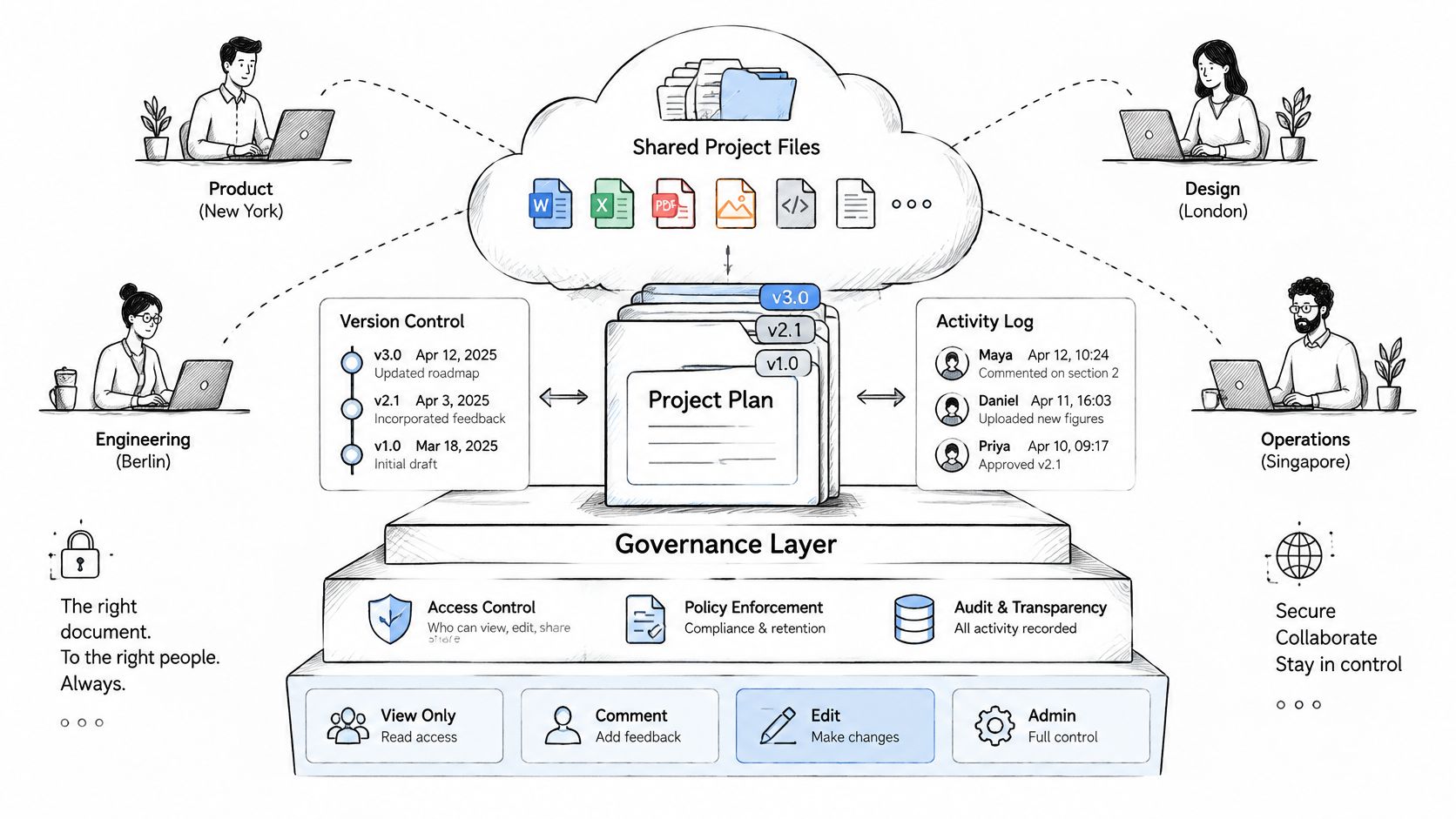
ISO 19650-1:2018 provides an information-management framework for exchanging, recording, versioning and organizing project information across the asset life cycle. In practical terms, establish information requirements, responsible information managers and controlled states such as work in progress, shared, published and archived before production begins.
A deliverable's metadata should identify its originating organization, discipline, location or zone, document type, number, status and revision. For BIM work, issue models, sheets, specifications and related records through a controlled common data environment, with approval history and permissions, rather than treating email attachments as authoritative copies.
The BIM execution plan should define the host document-control system, model ownership, turnover responsibilities, accepted formats and revision practices. The NCEES BIM guidelines discuss these governance needs and reference requirements addressing unique information-container identifiers, metadata, audit trails, granular access, backups, recovery and cloud security.
Keep the burden proportionate: Choose the fewest mandatory fields that preserve traceability, approval status, responsibility and handover value.
Assign permissions and escalation routes
Separate viewing, editing, approval and release. A remote drafter might edit a sheet; the responsible architect or engineer reviews the technical content; the designated document controller releases the authorized revision. Staffing location doesn't transfer professional approval authority.
Use a role-based matrix rather than leaving these boundaries in individual inboxes. The table below is a starting arrangement to adapt to the contract, not a substitute for its authority provisions.
| Role | Document responsibility | Review target and escalation rule |
|---|---|---|
| Project manager | Maintains registers, coordinates reviews and tracks decisions | Sets due dates from schedule needs; escalates missed commitments to the sponsor |
| Architect | Answers architectural RFIs and reviews relevant submittals and revisions | Confirms a response date; flags design dependencies to the project manager |
| Engineer | Reviews discipline-specific questions and technical changes | Identifies information needed; escalates unresolved safety or design concerns |
| Estimator | Evaluates quantities, pricing and change impacts | Returns the assessment before commercial approval; flags missing scope |
| BIM coordinator | Controls model exchanges, coordination issues and revision status | Uses the agreed exchange cycle; escalates unresolved clashes to discipline leads |
| Subcontractor | Raises RFIs, prepares submittals and supplies field records | Submits before affected procurement or work; flags late decisions |
| Owner | Approves scope, spending and time changes within reserved authority | Responds by the agreed decision date; names a delegate for absences |
Set response targets by record type and actual dependency, not by a universal deadline. An RFI blocking procurement needs a different escalation path from a noncritical finish question.
When evaluating solutions to outsourcing design and construction work, include access setup, software ownership, handoff procedures and release authority in the scope. Write the document-control matrix before the first drawing is issued, and test whether a new team member can identify the current authorized version without asking its author.
Applying Document Rules When a Medical Practice Runs the Project
A clinic build-out may expose contractors to practice spaces without requiring access to patient records. An EHR migration or remote patient-coordination launch can involve protected health information directly, so start by identifying which records contain or provide access to sensitive information.
Classify information before sharing it
Patient lists and scanned charts may contain PHI; access logs may contain sensitive identifiers; vendor credentials are security-sensitive even when they don't themselves contain PHI. Keep these out of general construction folders and unrestricted project reports.
The HHS Security Rule summary states that required Security Rule documentation must be retained for six years after the later of its creation date or the date it was last in effect. This covers required written policies, procedures and documented actions or assessments, not every ordinary project file, and HHS requires that documentation to be available to responsible implementers and periodically reviewed and updated as relevant conditions change.
Give compliance records an owner, revision date, controlled location and retention designation. Ending a remote staffing engagement shouldn't trigger deletion of required records just because the departing worker maintained them.
Match the agreement to the actual relationship
When a service provider acts as a business associate by creating, receiving, maintaining or transmitting PHI on the practice's behalf, HHS business associate guidance generally requires an agreement addressing permitted uses, safeguards, breach reporting, applicable subcontractors and return or destruction of PHI when the relationship ends. Don't assume every remote worker is a business associate, or that a confidentiality clause resolves the classification question.
The compliance lead should coordinate that determination and agreement review, with signature by the practice's authorized signatory. A project manager can track completion, but shouldn't decide the legal arrangement solely to keep onboarding on schedule.
Recommended operating controls include:
- A folder-access register: Name who may view, edit or approve sensitive project records.
- Approved storage and communication: Keep patient information out of personal email and informal task notes.
- Workspace safeguards: Establish clean-desk and screen-privacy practices for shared work areas.
- Access reviews and offboarding: Reassess access when duties change and remove it without destroying retained records.
These are practical implementation recommendations, not a claim that HIPAA prescribes each exact document format. A virtual medical receptionist, insurance verification specialist or prior-authorization support worker needs access appropriate to assigned administrative duties, not unrestricted access or authority to make clinical decisions.
Have qualified counsel or a compliance professional confirm obligations for the arrangement and relevant state requirements before granting access.
Choose the Minimum Document Set for Your Project
Start with the contract and the decisions people must make. Buying a large template library won't help if nobody can identify which records are mandatory, who maintains them or what approval permits work to proceed.
Work through the selection decisions
- Identify the contract form. A standard construction contract may specify formal notices, submittal procedures and change authorization. A simple remodel may need fewer records, but its scope and payment terms still need clarity.
- Count responsibility interfaces. Identify where design, procurement, construction and practice operations change hands. Each interface needs a reliable record of what was provided, accepted or left unresolved.
- Check external requirements. Owners, lenders, insurers and funders may prescribe report formats, evidence or retention obligations. Put those requirements in the document register before work starts.
- Match the delivery method. Design-build projects need clear design responsibility; model-based coordination needs a BIM execution plan and transmittal log. Don't require BIM documentation for a project that has no model-based information exchange.
- Assign a maintainer and approver. Identify who prepares the record, who checks it and who can authorize the resulting action. These may be different people.
- Review at major milestones. Remove unused duplication and add controls when new vendors, systems or risks enter the project. Preserve required history when changing the process.
Minimum document set by project situation
| Project Situation | Core Documents | Add When |
|---|---|---|
| Small remodel with one contractor | Scope summary, schedule, change orders, closeout list | Add an RFI or revision log when drawings change during work; document approval when the owner requests added scope |
| Commercial project under a standard contract | Charter or scope summary, schedule, RFIs, submittals, change orders, status reports, closeout package | Add prescribed reporting when a lender, insurer or owner requires specific formats |
| Design-build or multi-firm BIM project | All core documents plus BIM execution plan, document-control matrix and transmittal log | Add model-exchange, coordination and handoff controls when several firms, software platforms or time zones share the model |
| Publicly funded project | Core documents plus owner-specified records and retention rules | Add records required by funding or procurement rules; confirm reporting and retention requirements with the owner and counsel |
For a small medical practice launching remote scheduling support, the equivalent minimum might be a signed scope summary, implementation schedule, access checklist, issue log, approved workflow and handover record. A multi-specialty organization changing scheduling rules across locations will need more explicit stakeholder approvals and testing evidence.
Test the person who will maintain the records
Document support requires judgment, not just neat formatting. Give a candidate sample records containing an overdue response, a conflicting revision and an unapproved change, then ask for a current log and an owner-ready status summary.
For project managers, our practical test is a schedule or RFI exercise. Assess whether the candidate preserves source references, distinguishes pending from approved information and identifies who must decide next.
For a medical virtual assistant, use an administrative workflow exercise instead of assuming construction-document skills transfer automatically. For example, ask the candidate to track scheduling-training issues without copying patient details into the project log, and check whether they escalate clinical questions rather than answer them independently.
- Under-documenting: Leaves gaps in approval, responsibility and the basis for cost or schedule decisions.
- Over-documenting: Consumes staff time maintaining fields and reports that nobody reviews.
- A workable minimum: Allows another authorized person to reconstruct the decision and continue the work without relying on someone's memory.
Before launching the next phase, confirm the document set against the owner's requirements, the contract and applicable obligations. Where jurisdiction, funding or retention requirements are unclear, obtain qualified advice rather than treating a generic checklist as authoritative.
The Takeaway
Project management documents should preserve decisions, not merely accumulate files. Choose records that establish authority, define the baseline, route questions, authorize changes, communicate progress and support a usable handover. Each needs a maintainer, a clear status and a connection to the next action.
For a medical practice, separate construction and administrative coordination from clinical judgment and compliance approval. Start by reviewing an active project: identify the current approved scope, the unresolved decisions and the person responsible for each. Correct those gaps before adding more templates or giving remote staff broader access.
HireArchitects provides remote architecture, engineering and construction professionals, including project managers who maintain schedules, RFIs, submittals, change orders and owner reports. If your clinic build-out or design team needs dedicated documentation support, visit HireArchitects to discuss the role, software and working hours your project requires.